Obby: Fling Stuff and People
Obby: Fling Stuff and People
Urban Sniper Escape

FPV War Kamikaze Drone
Opening Cases - Knock Out The Arcana!

Worm out: Brain teaser games
Cars: Modes

Fairyland Merge & Magic
Robby: Escape The Rooms

TipTop: Tricky Challenges
Help Sprunki: Survival Simulator
Red and Blue Stick: fire and water 2
Beamng: Online City
Words with hints

Obby: Fling Stuff and People
Obby: Fling Stuff and People
Urban Sniper Escape
Urban Sniper Escape
FPV War Kamikaze Drone
FPV War Kamikaze Drone
Opening Cases - Knock Out The Arcana!
Opening Cases - Knock Out The Arcana!
Worm out: Brain teaser games
Worm out: Brain teaser games
Cars: Modes
Cars: Modes
Fairyland Merge & Magic
Fairyland Merge & Magic
Robby: Escape The Rooms
Robby: Escape The Rooms
TipTop: Tricky Challenges
TipTop: Tricky Challenges
Help Sprunki: Survival Simulator
Help Sprunki: Survival Simulator
Red and Blue Stick: fire and water 2
Red and Blue Stick: fire and water 2
Beamng: Online City
Beamng: Online City
Words with hints
Words with hints
Hunter with rifle
Hunter with rifle
A Wonderful Field: capital show
A Wonderful Field: capital show
Minecraft Editor
Minecraft Editor
Fun Clicker: Poppy Playtime 5
Fun Clicker: Poppy Playtime 5
Private Stand 2 Gold: Cheat and Promo Code
Private Stand 2 Gold: Cheat and Promo Code
Ultimate Fishing: Reel Catch
Ultimate Fishing: Reel Catch
Friday Night Funkin vs Imposter 2.0
Friday Night Funkin vs Imposter 2.0
Zombie Defense: Building Clearance
Zombie Defense: Building Clearance
Prison Escape Simulator 3D: Dig Out Master Journey
Prison Escape Simulator 3D: Dig Out Master Journey
Hospital Simulator 2025
Hospital Simulator 2025
Match 4
Match 4
Parkour in the tower of hell
Parkour in the tower of hell
Solitaire Classic Klondike
Solitaire Classic Klondike
Girl's Closet: Match & Clear
Girl's Closet: Match & Clear
Escape from Lava!
Escape from Lava!
Checkers
Checkers
Sprunki Phase 3
Sprunki Phase 3
Playground: Ragdoll War
Playground: Ragdoll War
Attack Hole
Attack Hole
Top Sniper
Top Sniper
DOP Complete the Picture
DOP Complete the Picture
Hexa Sort Puzzle
Hexa Sort Puzzle
Trampoline Basketball 3D
Trampoline Basketball 3D
Block Escape: Brain Training
Block Escape: Brain Training
Playground
Playground
Sprunki Action Playground: Ragdoll Sandbox
Sprunki Action Playground: Ragdoll Sandbox
Hunting: Italian brainrot animals 3D
Hunting: Italian brainrot animals 3D
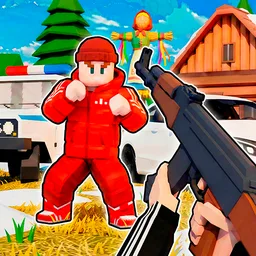
Boxteria invites you to an amazing cubic world, a dynamic criminal sandbox where your imagination sets the rules. Experience thrilling drift racing with 20 unique cars and engage in epic gang wars as a bandit, zombie, or even a police officer across diverse maps like Red Square and Russian Village. This open-world game offers endless opportunities for character creation and immersive gameplay, letting you decide your adventure without restrictive levels.
In Boxteria, your actions define the gameplay. You can spawn characters of various classes to engage in dynamic battles or summon cool cars for exhilarating rides and drift challenges. To get started, select the GREEN weapon to create characters or vehicles.
Control on the phone is carried out using the buttons on the screen.
In Boxteria, you enjoy complete freedom. Spawn diverse characters like bandits, zombies, or police officers to watch them fight, or create a team for thrilling gang wars. You can also spawn cars and perform tricks or enjoy high-speed drift racing across various maps, making every session a unique adventure.
Boxteria breaks away from traditional linear progression. There are no boring levels to complete one after another. You have the ultimate control to decide what to do and how to play, ensuring a truly open-world sandbox experience tailored to your preferences.
Creating your custom characters and cars in Boxteria is simple. Just select the GREEN weapon from your inventory. Once equipped, you can easily spawn new characters of different classes or bring out the 20 super cool cars available for your enjoyment.
Playing Boxteria on a computer is intuitive. Use the Left Mouse Button (LMB) to shoot or spawn characters and cars. Press 'Esc' for settings, 'Tab' to select characters or cars, and the Mouse Wheel to scroll through tools. 'Space' is for jumping, 'B' to get into a car, and 'V' to start a war. Mobile controls are managed via on-screen buttons. Dive into the boundless possibilities of Boxteria today and create your ultimate sandbox adventure!